

Switching from paper sketchbooks to an iPad opens up a flexible, portable studio—whether you want to draw for personal enjoyment, create content for social media, or build visual skills for work. With its intuitive interface and responsive brush engine, Procreate has become the go-to app for learners entering digital art.
If you are comparing options for a digital illustration course in Singapore, it helps to understand what core skills you typically learn in Procreate, how static illustration compares with 2D animation, and how structured classroom training differs from self-paced tutorials.
This guide breaks down what beginners typically learn in a Procreate course, how to compare static illustration with 2D animation tools like Procreate Dreams, and what to expect from our SkillsFuture-funded courses—including duration, fees, and subsidies.
What Beginners Typically Learn in Procreate
Opening Procreate for the first time can feel deceptively simple—until you try to shade cleanly, organise elements, or manage multiple layers on one canvas. Beginners learning Procreate typically focus on building repeatable digital workflows:
1. Canvas Setup, Resolution, and Colour Profiles
Before drawing your first line, it helps to set up a canvas suited to your final output. Learners typically explore how pixel dimensions and DPI prevent blurry prints, as well as when to use RGB (for screens and social media) versus CMYK (for physical stickers, prints, and merchandise).
2. Layers, Blending Modes, and Clipping Masks
Non-destructive editing is one of the biggest advantages of digital art. In Procreate, learners commonly organise linework, base colours, shadows, and highlights onto separate layers—and use tools like Alpha Lock, Clipping Masks, and Blending Modes to adjust lighting or recolour elements without redrawing.
3. Brush Control, Linework, and Shading
Procreate includes hundreds of brushes, which often overwhelms newcomers. Core practice focuses on selecting reliable brushes for sketching, inking, and shading, adjusting brush stabilisation for smoother curves, and building depth through light, shadow, and finishing touches.
4. Exporting and Sharing Your Artwork
Finally, learners typically export layered files (PSD) for further editing, transparent PNGs for design layouts, and built-in time-lapse replays to share their creative process.
How Our Illustration Essentials Course Works
In our Illustration Essentials course, learners apply these digital drawing fundamentals step by step—moving from initial sketching and basic shapes to colour, shading, and finishing touches, taking an illustration all the way from first sketch to final artwork.
Static Digital Illustration vs. 2D Animation: Which Track Fits Your Goals?
When researching an illustration course in Singapore, you will likely encounter both static digital illustration apps (such as Procreate) and 2D animation apps (such as Procreate Dreams and AI-assisted animation workflows). Choosing the right course depends on whether you want to create still artwork or bring characters and stories to life through movement.
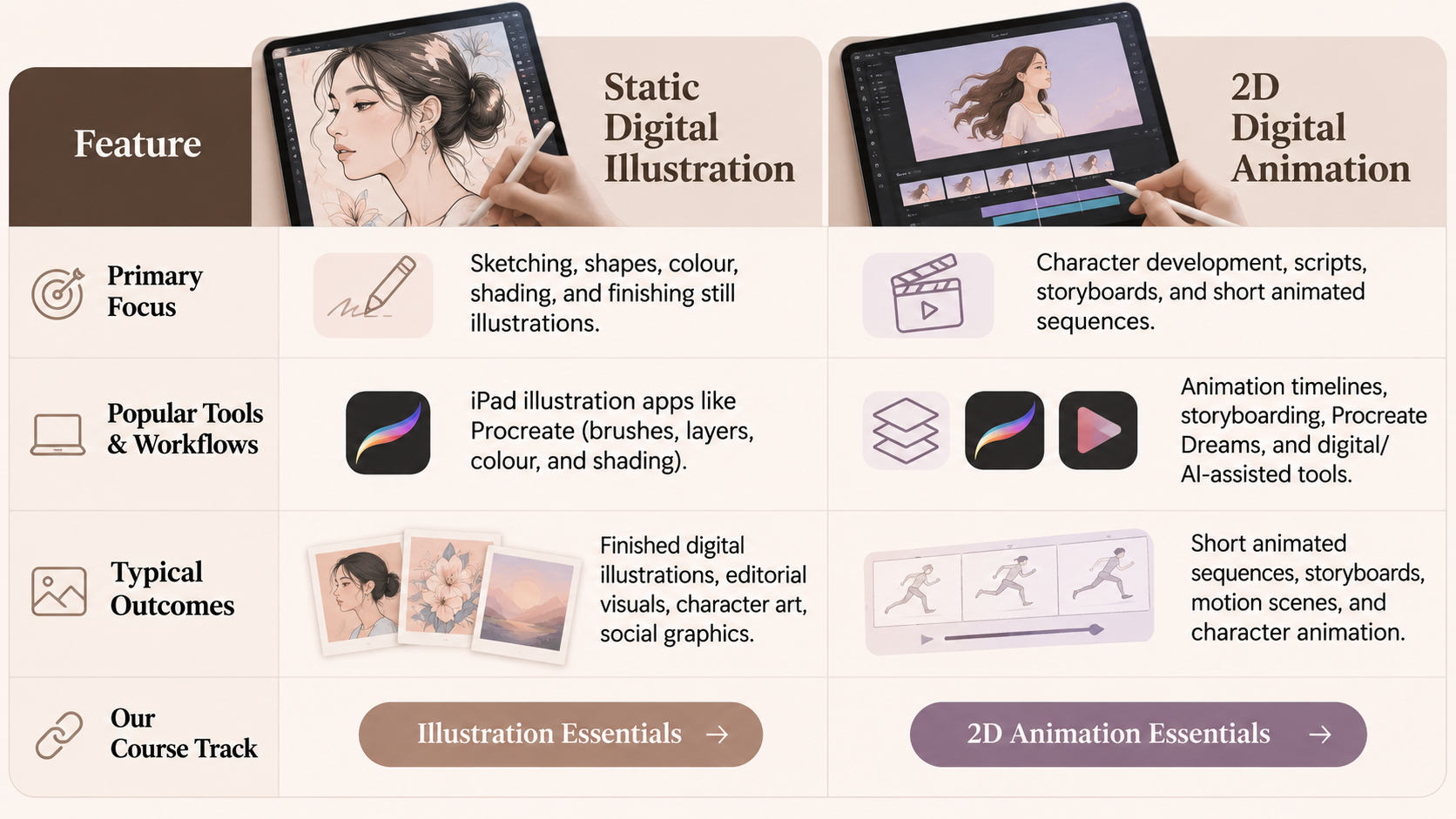
Choose 2D Animation Essentials if you want to develop characters, scripts, and storyboards, apply animation principles, and use digital and AI-assisted tools to create a short animated sequence.
Self-Teaching vs. a Classroom Illustration Course in Singapore
Free video tutorials are great for picking up quick tricks, yet many self-taught learners hit a plateau after a few weeks. Joining an in-person Procreate course or digital art class solves three common hurdles:
- Immediate Feedback on Technique: A trainer can spot awkward workflow habits, messy layer stacks, or muddy colour choices in real time and show you a cleaner approach on the spot.
- Structured Progression: Instead of jumping randomly between disconnected online videos, a classroom syllabus builds skills in logical order—from basic shapes and sketching to finished, cohesive artwork.
- Dedicated Practice Time: Setting aside two full workshop days away from daily distractions lets you immerse yourself in hands-on projects and walk away with finished pieces.
Course Duration, Fees & SkillsFuture Funding
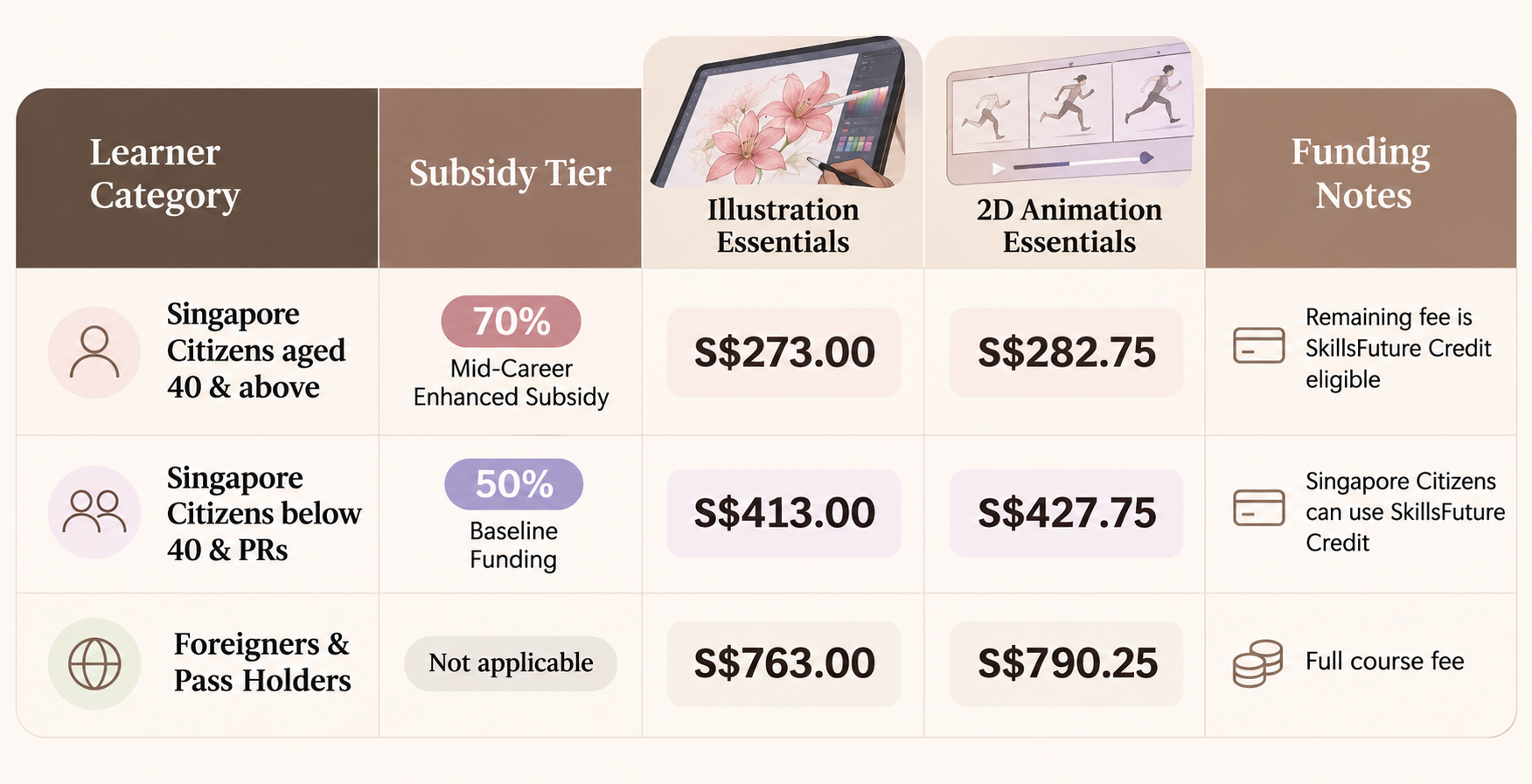
Both Illustration Essentials and 2D Animation Essentials run over 2 days (16 hours total) at Orchard Central or Commonwealth, depending on your selected intake.
Both courses are listed among our SkillsFuture-funded short courses:
Frequently Asked Questions
Do I need prior drawing or digital art experience?
Basic drawing or digital experience helps, but you don’t need to be an artist. Illustration Essentials is designed for learners with some art or digital experience, while 2D Animation Essentials is ideal if you have basic drawing or media experience.
Should I take Illustration Essentials before 2D Animation Essentials?
If you want to strengthen your drawing, colour, and shading skills first, starting with Illustration Essentials builds a strong foundation. However, if you already have basic drawing or media experience and want to focus on storyboards and motion, you can enrol directly in 2D Animation Essentials.
Can I use SkillsFuture Credit for these courses?
Yes, if you are a Singapore Citizen aged 25 and above with available Opening SkillsFuture Credit. Singapore Permanent Residents are eligible for 50% baseline course fee subsidies. See full eligibility rules on our subsidies page.
Start Creating Digital Art and Animation
Whether you want to build confidence in digital illustration or bring characters to life through 2D animation, hands-on instruction helps you progress faster. Explore upcoming intake dates and course outlines on our Illustration Essentials and 2D Animation Essentials pages, check your funding tier on our subsidies guide, or browse all SkillsFuture courses to plan your next creative skill.


