Desktop 3D printing has shifted rapidly from a niche engineering tool to an accessible creative technology for hobbyists, designers, and small business owners. In October 2026, TechNode reported that desktop printer maker Bambu Lab surpassed 1 million consumer 3D printers sold in China—a milestone mirrored locally, where Google Keyword Planner data shows a 125% rise in Singapore searches for "Bambu Lab Singapore".
As high-speed consumer printers make hardware easier to own, the real hurdle for newcomers is knowing how to turn a rough idea into a clean, printable 3D file. Taking a hands-on 3D printing course in Singapore bridges that gap, giving beginners structured guidance on 3D modelling, print preparation, and troubleshooting before wasting time or filament on failed prints.
Whether you are considering buying a home printer or want to prototype a physical product idea, this guide covers what beginners actually learn, how to compare learning options, and what to expect from our 3-day Creating From Concepts course.
Why Take a Structured 3D Printing Course Instead of Self-Teaching?
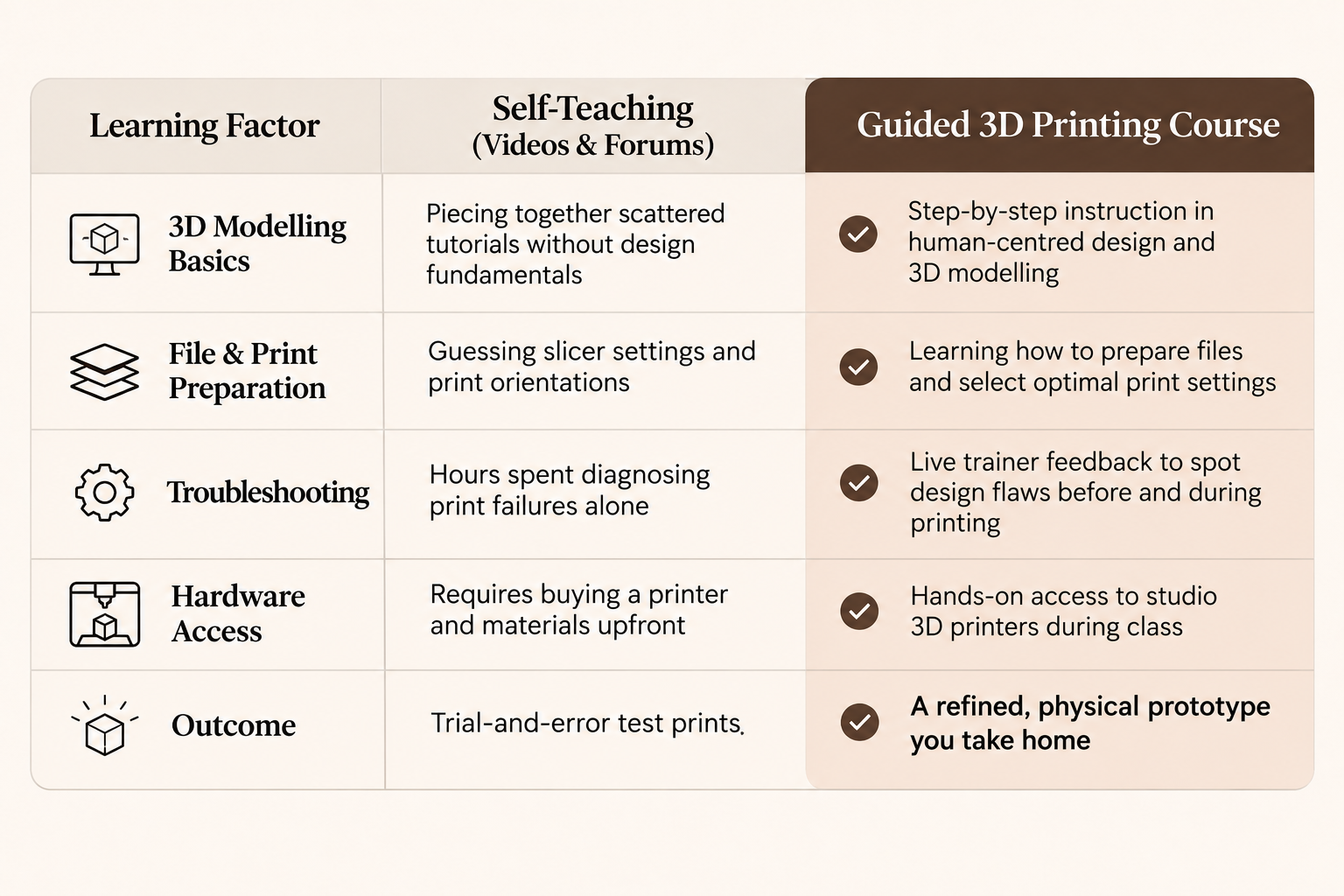
Unpacking a desktop printer and downloading ready-made files online is straightforward, but designing your own functional objects requires mastering a multi-step digital-to-physical workflow. Beginners teaching themselves through trial and error often run into layer adhesion failures, structural weak points, or files that cannot be sliced properly.
When comparing self-study against a guided classroom programme, the biggest difference lies in feedback and workflow structure:
What You Learn in a Beginner 3D Printing Course
A practical beginner curriculum focuses on the complete product development cycle rather than just pressing "print" on an existing file. In our 24-hour (3-day) Creating From Concepts course (Ref. Code: TGS-2025053783), learners move through three core stages:
1. Understanding the 3D Printing Workflow
Before opening modelling software, you learn how an idea evolves into a physical object. This covers core principles of product design, visual semantics, and human-centred design—helping you plan forms that are both functional and realistic to print.
2. Creating and Preparing Your Digital Design
Next, you learn the fundamentals of 3D modelling and iterative form exploration. You will build your digital model, prepare the file for 3D printing, and configure essential print settings so the printer can execute your design accurately.
3. Printing, Testing, and Refining Your Prototype
Once your file is ready, you gain hands-on experience operating 3D printers in class. As your prototype prints, your trainer guides you through troubleshooting common issues and refining your design so you leave with a finished 3D printed prototype you can take home.
Who Should Enrol?
You do not need an engineering background or prior CAD experience to join a beginner course. Structured training is particularly useful for:
- Complete 3D Beginners: Anyone curious about additive manufacturing who wants a clear, jargon-free foundation from day one.
- Aspiring Product Creators & Entrepreneurs: Learners who have a specific product or packaging concept in mind and want guidance from a trainer on how to make it printable.
- Prospective Home Printer Buyers: Makers researching consumer machines—including popular brands driving the Bambu Lab Singapore trend—who want to understand file preparation and workflows before investing in hardware.
Course Details, Fees & SkillsFuture Funding
The Creating From Concepts course runs over 3 days (24 hours total) at Orchard Central or One Commonwealth, depending on the scheduled intake.
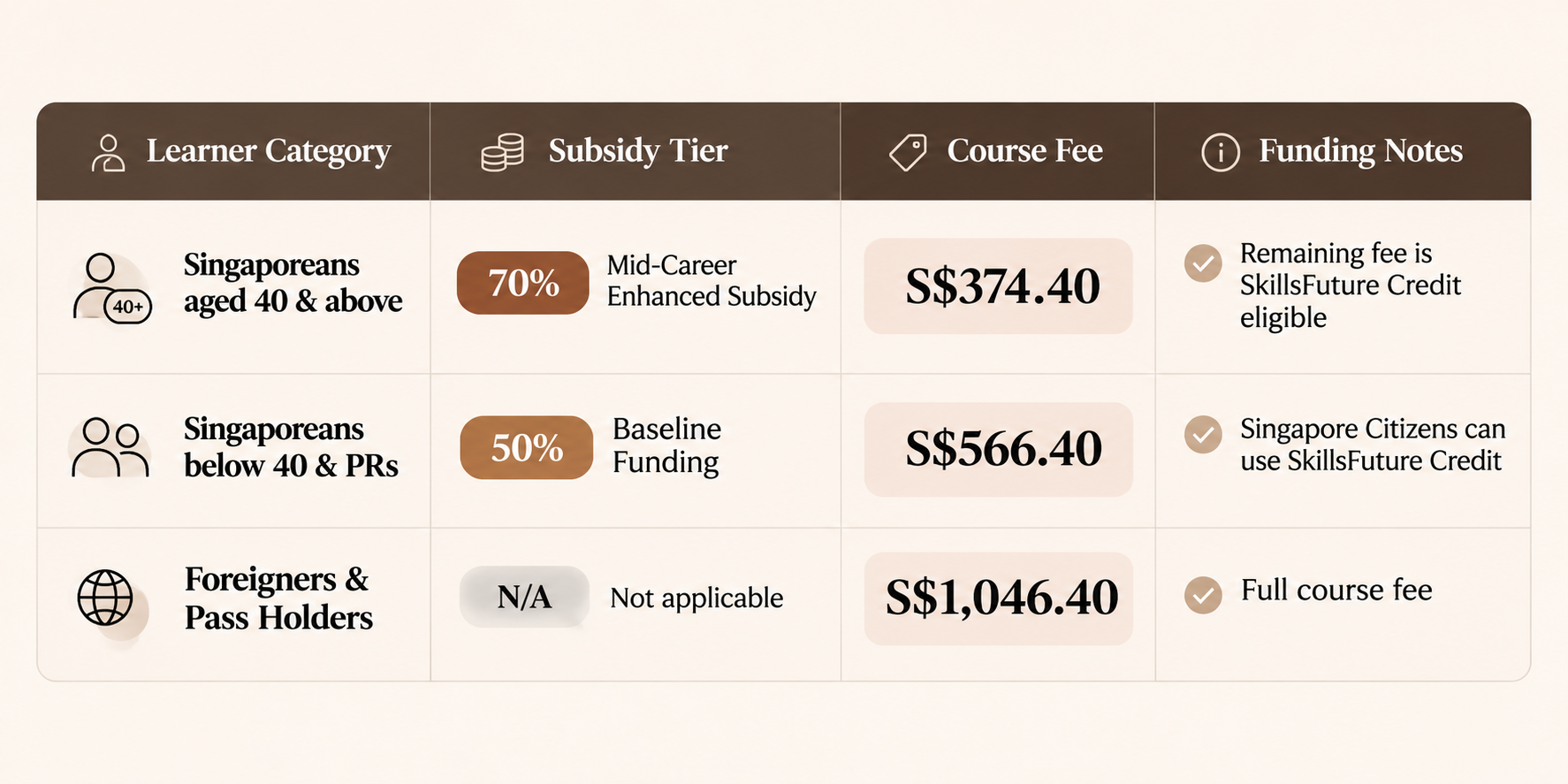
Because the course is listed on MySkillsFuture, eligible Singapore Citizens and PRs receive course fee subsidies, and Singapore Citizens can use SkillsFuture Credit for the remaining fee.
Frequently Asked Questions
Do I need any 3D design or 3D printing experience?
No. The course is designed for beginners with zero prior experience in 3D modelling or 3D printing.
What do I need to bring to class?
Please bring your own iPad or laptop for the 3D modelling and file preparation segments. Our team will share the exact preparation details with you once your registration is confirmed.
Can I bring my own product idea to print?
Yes. You are encouraged to bring your own concept, and the trainer will guide you on how to adapt and prepare it into a printable 3D model.
Do I get to keep what I print?
Yes. Your prototype is 3D printed during the course, and you take your completed physical prototype home at the end of the three days.
How does registration work?
Select an intake period on the Creating From Concepts page and submit the short registration form. Submitting the form registers your interest—our team will then contact you directly to confirm your place, exact class dates, and funding details.
Start Turning Your Ideas into 3D Prototypes
Whether you want to build practical prototyping skills for work or master the fundamentals before setting up a home printer, hands-on instruction takes the guesswork out of getting started. Explore upcoming intake periods on our 3D printing course in Singapore page, check your eligibility on our subsidies page, or browse all SkillsFuture courses to plan your next learning milestone.